Creating a program on Program OS helps your organization define everything needed to launch and manage an innovation program, from basic program information to application requirements, funding structure, mentors, partners, AI review criteria, and final publishing.
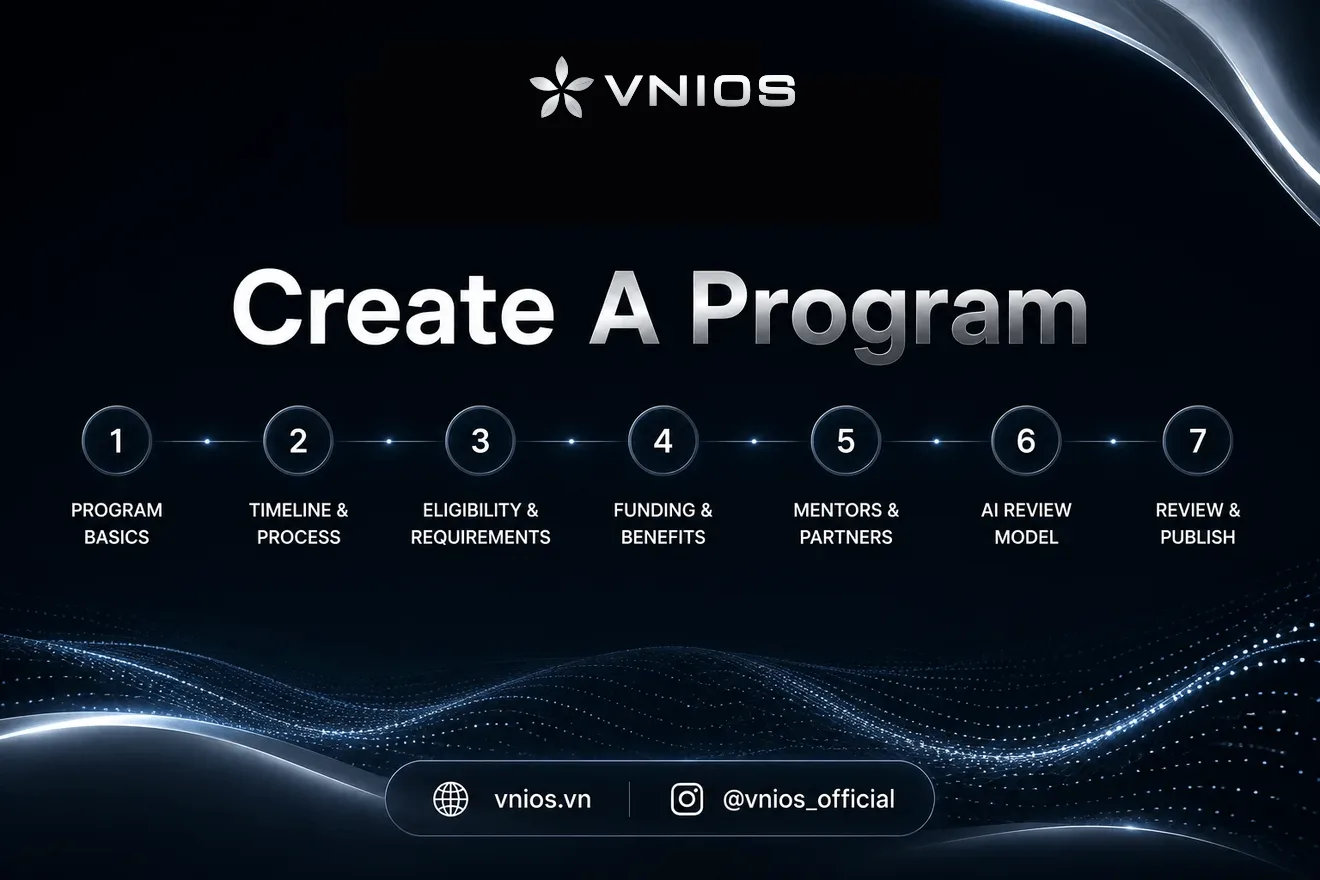
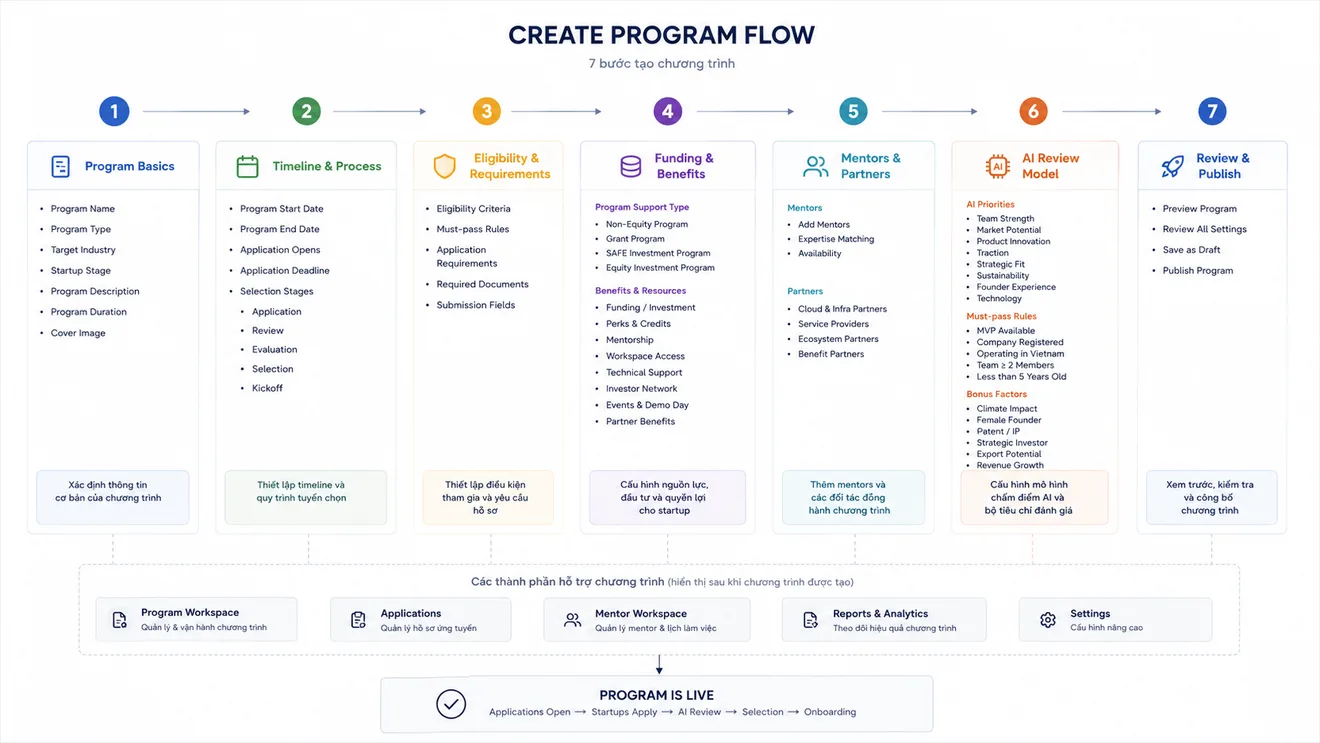
The Create Program flow is designed as a 7-step setup process. Each step helps you configure one important part of your program before it goes live.
Step 1: Program Basics
Start by adding the core information about your program.
You will define:
- Program Name
- Program Type
- Target Industry
- Program Description
- Startup Stage Focus
- Program Duration
- Program Cover Image
This step helps applicants understand what your program is about, who it is designed for, and what kind of startups you want to attract.
Example:
- Program Name: AgriTech AI Accelerator 2026
- Program Type: Accelerator
- Target Industry: AgriTech, AI, ClimateTech
- Startup Stage: Pre-Seed, Seed, Series A
- Program Duration: 12 months
A clear Program Basics setup makes your program easier to discover and helps startups quickly understand whether they are a good fit.
Step 2: Timeline & Process
Next, define your program timeline and selection process.
You will configure:
- Program Start Date
- Program End Date
- Application Open Date
- Application Deadline
- Selection Stages
Selection stages help you structure how applicants move through the process.
Example stages:
- Application
- Initial Review
- Evaluation & Interview
- Selection
- Program Kickoff
Each stage can include a name, description, and duration. This makes the review process more transparent for both your team and applicants.
Step 3: Eligibility & Requirements
This step defines who can apply and what information applicants must submit.
You can configure eligibility criteria such as:
- Company Registration
- Operating Country / Region
- Company Age
- Team Size
- Revenue Stage
- Startup Stage
Each criterion can be marked as required or optional.
You can also define application requirements such as:
- Pitch Deck
- Business Plan
- Financial Projections
- Company Profile
- Product Demo Link
- Additional Information
Each requirement can have a field type, status, and on/off setting.
This step helps your organization collect consistent, high-quality applications and reduce manual follow-up during the review process.
Step 4: Funding & Benefits
Funding & Benefits lets you define how your program supports startups.
Program OS supports multiple support models:
- Non-Equity Program
- Grant Program
- SAFE Investment Program
- Equity Investment Program
Each model can be configured differently depending on how your organization wants to support startups.
For a Non-Equity Program, you can provide support and resources without making a financial investment.
For a Grant Program, you can define a total program budget, maximum award per startup, number of startups to fund, and funding milestones.
For a SAFE Investment Program, you can configure investment amount, SAFE type, valuation cap, discount, and related terms.
For an Equity Investment Program, you can define total investment pool, ticket size, target number of startups, equity range, investment stage, board seat, and additional investment rights.
You can also select additional benefits such as:
- Mentorship
- Workspace Access
- Technical Support
- Investor Network
- Partner Benefits
- Cloud Credits
- Media Exposure
- Talent Support
- Events & Demo Day
This step allows your organization to clearly communicate the value startups will receive from joining the program.
Step 5: Mentors & Partners
Mentors and partners help strengthen the value of your program.
In this step, you can add mentors and assign their areas of expertise.
Example mentor expertise:
- AI
- AgriTech
- Computer Vision
- IoT
- Growth
- Go-To-Market
You can also add partner organizations that support the program.
Example partners:
- Google for Startups
- AWS Activate
- Microsoft for Startups
- Cloud providers
- Service providers
- Ecosystem partners
Mentors and partners give startups access to knowledge, networks, tools, credits, and support that can help them grow faster during the program.
Step 6: AI Review Model
The AI Review Model helps your organization define what a strong applicant looks like.
You can describe your Program Thesis, which tells AI what kind of startups your program wants to attract and support.
Example Program Thesis:
"We are looking for ClimateTech startups using AI and data to improve agriculture and sustainability in Vietnam and Southeast Asia. We prioritize founders with domain expertise, strong execution ability, and early customer validation."
You can then select AI priorities such as:
- Team Strength
- Market Potential
- Product Innovation
- Traction
- Strategic Fit
- Sustainability
- Founder Experience
- Technology
You can also define hard requirements that applicants must pass, such as:
- MVP Available
- Company Registered
- Operating in Vietnam
- Less than 5 Years Old
- Team ≥ 2 Members
Finally, you can add bonus factors that improve applicant scores.
Examples:
- Climate Impact
- Female Founder
- Patent / IP
- Revenue Growth
- Strategic Investor
- Export Potential
Program OS will use these inputs to help evaluate applications more consistently. AI does not replace human reviewers, but it helps reduce manual workload and supports better decision-making.
Step 7: Review & Publish
The final step is to review your program configuration before publishing.
Before launch, you should check:
- Program information
- Timeline and selection process
- Eligibility criteria
- Application requirements
- Funding and benefits
- Mentors and partners
- AI review model
You can save the program as a draft if you need more time to complete the setup.
Once everything is ready, you can publish the program.
After publishing, the program becomes live and ready to receive applications.
What Happens After Publishing?
Once your program is live, startups can begin applying.
The full program lifecycle continues with:
- Applications Open
- Startups Apply
- AI Review
- Reviewer Evaluation
- Selection
- Onboarding
- Program Workspace
Accepted startups can then move into the Program Workspace, where your team can manage participants, mentors, sessions, resources, milestones, funding, and program outcomes.
Best Practices
Before publishing a program, make sure your team has clearly defined:
- Who the program is for
- What industries and stages you want to support
- How the selection process works
- What documents applicants need to submit
- What benefits startups will receive
- Who will mentor and review startups
- How AI should evaluate applications
A well-configured program helps attract better applicants, reduce operational confusion, and create a smoother experience for both startups and program operators.
 Written byNDA-IOS Team